As it happens every year in May, I did my taxes with my accountant. Once I had a proper result, I started thinking about how AI could help me review it. So I looked for a skill to double-check my accountant’s work before sending it to the tax office.
I found a great one by @josecontic on X (full thread). It works really well. But… why use a skill?
Anatomy of a skill
A skill is a text file with structured instructions for a specific task. I always think of it as a cooking recipe. It has concrete steps, and any cook (agent) can pick up the book and follow it. The result, as in real life, will never be exactly the same, but it will be very similar.
In the case of my tax declaration, the skill I used has specific instructions: the steps to follow, where to look for information, which deductions apply to each region, etc. Could I do all this without a skill? Yes, but the result would be much worse. Skills help you turn a generalist agent into a specialist for a specific task.
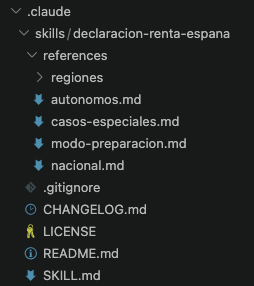
There is a SKILL.md file that I imagine as a brain, and then a set of documents with reference information that can be loaded if necessary as national tax rules, edge cases, region tax rules, etc.
The key is putting into context only the information that you need. An agent works much better with a small and focused context than when you give all information at once.
How did I get started?
In this case I used a Claude project. I created a project folder in VS Code, downloaded the skill from GitHub, and placed it into the .claude/skills directory. Then I added my documentation directly in the project folder. After that, I started asking Claude about my taxes and it automatically loaded the information from the skill. That’s it.
But… are skills only for Claude Code?
Not at all! Skills were originally created by Anthropic, but they’ve become a de facto standard. Nowadays you can use skills with other platforms like Cursor, Windsurf or GitHub Copilot. In fact, I ran the same test with Copilot without changing anything, and it works just as well.
We used the same file structure for two different tools, and got very similar results.
Beyond the taxes
Skills are a great invention because they let you go beyond the surface with AI. They are a simple way to share how to do things, and they work across different tools.
As you can read in my blog, I have my personal second brain to store what I know. Now I’m thinking about creating skills with the “how I do things”. This is, in fact, live documentation that agents can actually use.
In the next post, we’ll build a skill together from scratch.